// >> November 2010
Mining Mailinator
Austin Diener | 19. November, 2010
for those who are unfamiliar, mailinator is a site/service that accepts and temporarily stores any e-mail it receives. that’s right, any e-mail received by the mailinator mail servers is shuffled into the appropriate inbox as if it already existed. you simply choose which @mailinator.com e-mail address you would like, regardless of whether or not it has been used in the past, and use it as if it were your own. this makes it extremely useful when, for example, you are required to register for a site in order to download a white-paper. or, perhaps you would prefer not to use your @gmail.com address when browsing myhotmatez.com.
while recently using the site an idea came to me suddenly — if i were to mine data from mailinator inboxes, could i find anything interesting? i was curious to find out whether people used this service for legitimate reasons or if it was merely a dumping ground for spam. to entice me, i realized mailinator allows you to access an inbox by appending the username to the following url http://www.mailinator.com/maildir.jsp?email=x (where x is the username).
so, i fired up vi and began piecing together a python script to automate the discovery and reporting of messages across multiple inboxes. the logic was simple:
- read in a list of words (i.e., usernames).
- for each word pull down a listing of the current e-mails for that inbox.
- for each e-mail strip out the ‘from:’ and ‘subject:’ fields.
- write this information to csv in the format [username, from:, subject:, url] (where url is a link to the full e-mail message).
- boom, review.
after completing the script, i began by slowly feeding it lists of 5 to 10 usernames — mostly names of actual people (e.g., bob, sarah, frank). even though i was able to scrape hundreds of e-mails, 99% of them were easily identifiable as spam. i then proceeded to words that could be associated with a specific task someone was trying to accomplish (e.g., code, temp, password, exchange). while still mostly spam, i managed to find a few interesting tidbits:
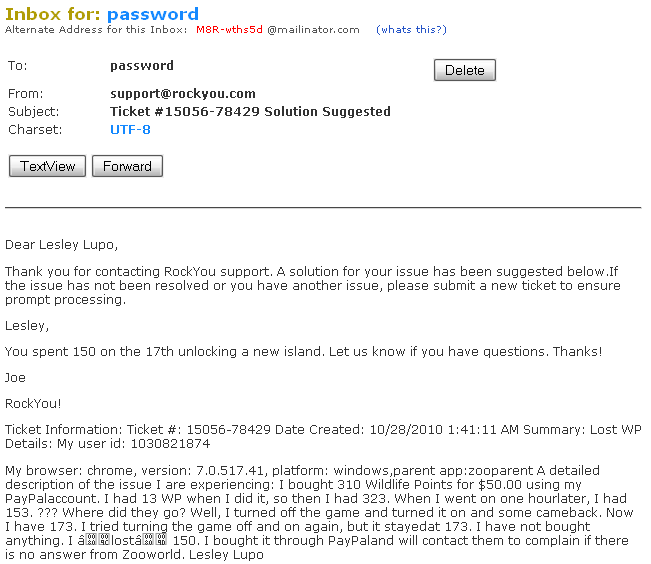
it looks as though lesley lupo was concerned about her wildlife points in zooworld. ok, maybe this isn’t that interesting but i did find it odd that someone would register a mailinator e-mail address for a service (zooworld) that accepts payments — where they are actively purchasing goods. the next one struck me as a little concerning:
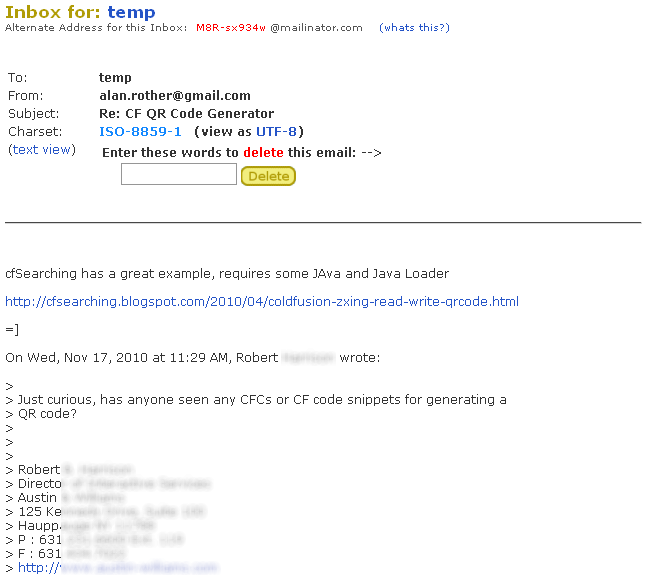
you’ll notice i blurred sections of the e-mail out. that’s because it contains Robert’s full contact information including the company he works for. i can imagine that someone with a bit more time could easily modify the script to look for these types of sections within an e-mail. jackpot.
i’m continuing to mine for this type of data using various sets of usernames. i expect to post updates as i find more interesting information. my main reason for publishing this now is to gather ideas for improvement of the script and mostly because i know if i didn’t post it now, i never would. here are a few ideas for next steps:
- add logic to filter messages with subject lines including specific words (e.g., free, discount, xanax).
- pull down and store the entire e-mail message locally (messages are regularly pruned on mailinator servers).
- extract the originating mailserver ip to graph the distribution of messages across their source.
- tidy up my python code and define functions for each task.
/edit i forgot to mention the name of the file where usernames are read should be titled ‘words.txt’ and be in the same directory as mailinator.py.
LinkedIn Update – Ummmm, Update
Deron Grzetich | 9. November, 2010
So the tactic has been around for a while. A quick search found this posting by Neal Schaffer, http://windmillnetworking.com/2009/05/21/fake-linkedin-profile-how-to-spot/, in which the fake profiles use the same method as the profiles I found. The big difference is that these fake profiles targeted people not in security but those who are “specialists in social media”…which means it is more than likely that “sets” of fake profiles exist to target different groups (i.e. security, IT, marketing, etc.).
Note that this is not the same as the Robin Sage or Marcus Ranum fake profile experiments.
The author brought up a good point here, and a question I posed to LinkedIn directly…why can’t LinkedIn police this? They have direct access to the data and I’m sure finding similar profiles based on a set of simple logic shouldn’t be that difficult to data mine…right? So far their response has been: “We don’t have an answer yet.”
LinkedIn Update
Deron Grzetich | 4. November, 2010
Sorry, but my curiosity got the best of me on this one and I dug a little deeper into the fake profile issue and it seems I only hit the tip of the iceberg before. I originally found 15 fake information security profiles, but that was because I limited my search to a specific job title in New York. The set of job titles I’ve identified that are associated with the fake profiles are (for the current title, case left as they used it in the title):
- Information Security Manager
- Information Technology and Services Consultant
- Database Security Analyst
- Security Operations Manager
- IT security Manager
- It Risk Manager
- Information Security Senior Consultant
- System Security Manager
Again, all of the profiles show the “Greater New York Area” as the location. If you’re doing a search on LinkedIn just choose one of the titles above along with a limitation within 50 miles of the 10001 zip code. I stopped tracking the companies and universities they used in creating the profiles as it became too large of a list to be useful. The job descriptions are usually enough to give them away as they are weak and don’t make sense.
Let me go back to my assumption this was scripted, and they suck at scripting. Case in point:
Let’s take a look at my boy Dwayne (http://www.linkedin.com/pub/dwayne-larson/24/799/720). In addition to his killer profile photo, check out his past positions. Seems the script was supposed to randomly choose a company name that started with a “V” for his job between 2002 and 2007…hmmm, it seems to have gone a little haywire here. And how about my boy Alexander’s title (http://www.linkedin.com/pub/alexander-baldwin/20/b43/a9b) of Security Solutions ManaIT Project Managerger. Don’t know about you, but I wouldn’t hire a guy who couldn’t spell his own title.
One other interesting twist is the use of recommendations, links to the company website, and information in the summary section. This all goes to make the profile look more legit. Take for example our guy Gary (http://www.linkedin.com/pub/gary-jacobson/24/398/b04)…that’s funny, looks just like Ross’ summary, which appears legit (http://www.linkedin.com/in/rossboulton).
Let’s look at some recommendations. Harry (http://www.linkedin.com/pub/harry-bright/23/904/71b) took the time to recommend his buddy Stuart Michael (tp://www.linkedin.com/pub/stuart-michael/24/1bb/440). What a nice guy…too bad both are fake.
Finally, some numbers. I’ve identified 123 fake infosec profiles with connection numbers ranging from 52 to 500+, with the average number of connections at 250 for each profile. So, does LinkedIn even care?
LinkedIn connection mining via fake profiles
Deron Grzetich | 3. November, 2010
I’m sure we’ve all seen the fake Facebook profiles by now….something along the lines of an invite from an attractive young woman with wall posts related to some “hot new pics” that she just took. Sure, you have to click on the link to see the pics, which then promptly redirects the browser and attempts to exploit some vulnerability on your machine and install malware. But what about the profiles that do little else than, 1.) appear to be legit, 2.) ask to be connected to you, and 3.) do nothing else (or so you think)?
Being a security professional I’m always a bit skeptical when I get an invite to connect with someone on LinkedIn and a few things throw up red flags when I review the profile. Do you live near me? Do you work for a client of mine? Did we go to the same school? And most importantly, do we have any connections in common? Being that security is a fairly small community I would find it odd that you know me but don’t know anyone else that I know.
Last week I received an invite from someone in NY who is working as a senior information security consultant for a big name firm. Interesting, but we didn’t have any connections in common and I didn’t know the person so I let it sit in my inbox for later review. This week I received another similar invite from someone in NY, with a similar title working for another big name company. One thing that caught my eye was the year the person graduated college. While I have a decent ability to remember names my brain has been wired in such a way that numbers tend to stick. So when I noticed they both had a MS in Computer Science and graduated in 2000 I became a little suspicious. Looking back at the previous invite I noticed they had the same title, during the same period of time, and only the company name was different. A review of these two prompted some further research. Here is what I found:
The fake profiles, 15 in all, used to mine your connections and probably map the infosec community, may have been generated by a script. But possibly not as there are some oddities with some of the profiles that make them appear to be created by hand…either way, someone had some time or they suck at scripting. Regardless, if you get an invite to connect on LinkedIn here are some things to look for:
Location:
- The person is from the Greater New York Area
Current Title:
- Senior IT Security Consultant at * (replace * with the company list below)
College years:
- Either 1995-2000 (8 of 15) or 1996-2001(7 of 15)
Schools used (all with a major of MsC in Computer Science):
- University of Illinois at Urbana-Champaign
- Cornell
- Purdue
- The University of Texas at Austin
- University of Michigan
- University of Wisconsin-Madison
- University of Maryland College Park
Current position description:
- Too long to post, but it doesn’t make sense as some of it overlaps, includes ISO 27000/270005, and has some random ending information such as “network assessment”. It was probably lifted from someone’s actual job description.
Job titles (seem to be randomly paired with a company):
- Information Security Manager
- Information Technology and Services Consultant
- Information Security Consultant
- Senior IT Security Consultant
- IT Project Manager
- Database Security Analyst
- System Security Manager
- CISSP (and sometimes lowercase cissp)…maybe some issues with the script?
Organizations/Companies:
- Accenture
- IBM
- Cognizant Technology Solutions
- Sun
- Xerox
- Texas Instruments
- Oracle
- Cisco
- Verizon
- Symantec
- E&Y
- Microsoft
- EMC
- Adobe
- HP
- KPMG
- PWC
Profile Names (** means they used the 1996-2001 grad years):
- John Porter
- John Blum
- Paul Kane
- Ben McBride
- Michael Gardner**
- John Wayne
- Daniel Webster
- John B.
- Neil B.
- Bob D.**
- Bill P.**
- Zachary T.
- John M.**
- Cliff B.**
- John B. **
Yes, you may have noticed I have access to some of the last names…and that is because someone that is connected to me has accepted one of these fake profiles as a connection. I’m actually upset that I didn’t think of this. What better way to map the security resources at various companies? I started wondering a while ago if we could use the API to script a pull of public data and then do some quick analysis to see where everyone ends up once they leave a particular company. Maybe that is already happening?
Finally, I’ll let you figure the impact out, but these fake profiles have between 80 and 476 connections with an average of 321 per profile.
This post is only meant to shed some light on the data mining issues within LinkedIn specific to the InfoSec community. I’m sure this is happening in other fields as well…so if you’ve seen this please post in the comments section.